
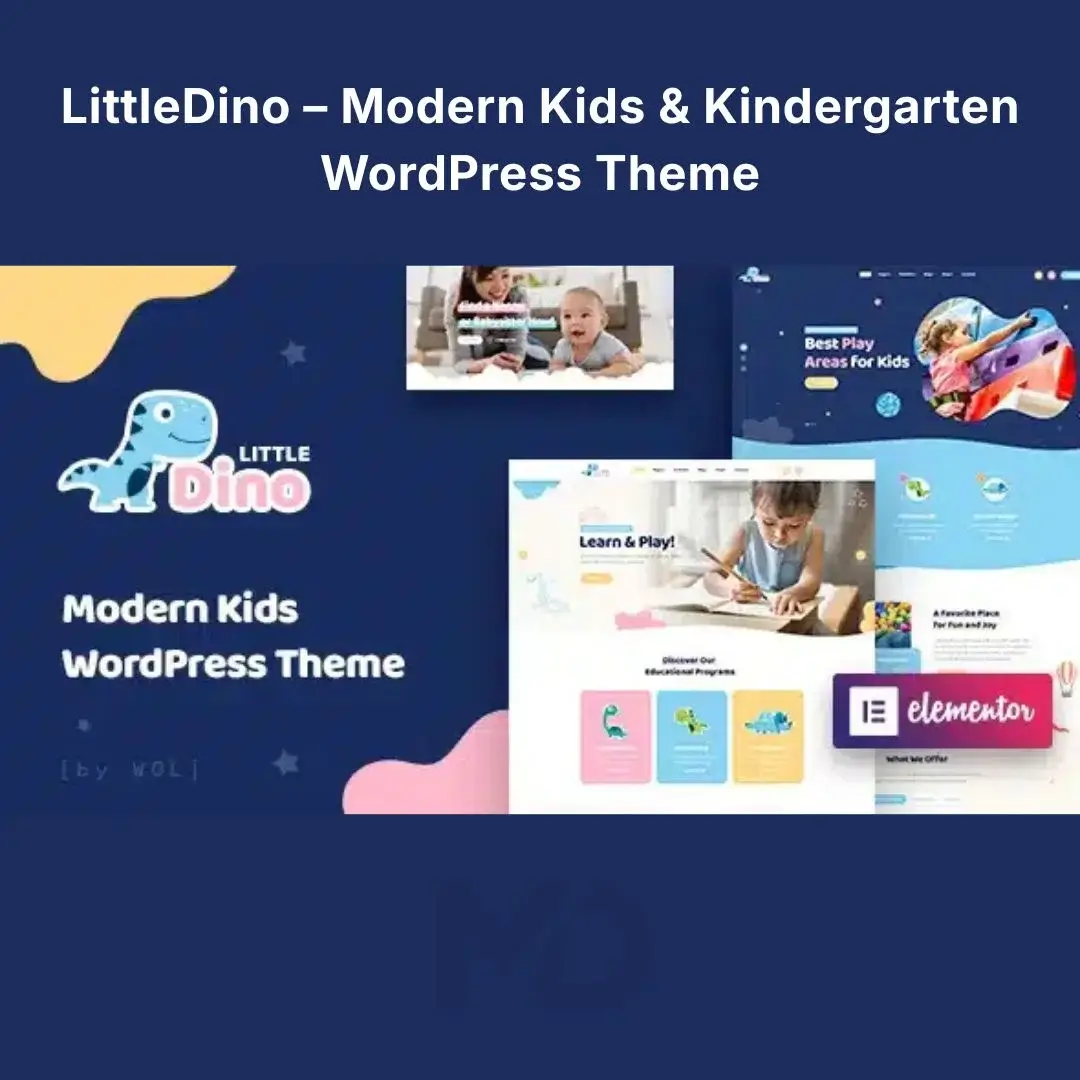


LittleDino Kids – Modern Kids & Kindergarten WordPress Theme
Create a colorful, professional, and family-friendly website for kindergartens, preschools, nurseries, childcare centers, babysitters, playgrounds, educational programs, and kids’ stores without starting from scratch.
LittleDino Kids combines a playful modern design with powerful WordPress customization tools, making it easier to build a website that looks welcoming to children while giving parents the information they need to take action. The theme is built around Elementor, includes multiple homepage designs, 20+ ready-made pages, 30+ custom elements, responsive layouts, WooCommerce support, and one-click demo import.
Key Features
Elementor Drag-and-Drop Builder
Customize your website visually without requiring coding knowledge. Edit page layouts, text, images, buttons, sections, and other elements directly through Elementor.
Ready-Made Homepage Designs
Get started quickly with multiple professionally designed homepage layouts instead of spending hours building your website from a blank page.
20+ Pre-Made Pages
Build essential sections such as About, Programs, Services, Team, Gallery, Blog, Contact, and other inner pages using ready-made layouts.
30+ Custom Elements
Add specialized content blocks and design components to create engaging pages while maintaining a consistent visual style.
Drag-and-Drop Header Builder
Create customized headers using the flexible header builder and presets. Adjust navigation, layouts, colors, typography, and other elements to match your brand.
One-Click Demo Import
Don’t want to build everything from scratch? Import the available demo content and use it as your starting point. Simply replace the demo text, images, programs, and contact details with your own content.
WooCommerce Ready
Turn your website into a children’s products or educational store. WooCommerce compatibility allows you to sell toys, educational products, books, merchandise, courses, or other products directly from your website.
Responsive & Mobile-Friendly
Your website automatically adapts to different screen sizes, helping parents and visitors browse comfortably from desktops, tablets, and smartphones.
Team & Staff Sections
Showcase teachers, caregivers, instructors, staff members, and other professionals with dedicated team presentation modules.
Portfolio, Gallery & Blog
Show activities, classrooms, events, projects, and facilities through flexible portfolio and gallery layouts. Use the blog to publish parenting tips, school announcements, educational resources, and news.
Custom Colors & Typography
Create a consistent visual identity by customizing colors, fonts, and other design settings. The theme also provides extensive theme options for controlling your website’s appearance.
RTL & Translation Ready
Suitable for multilingual websites and right-to-left languages, making it useful for businesses and educational organizations serving international audiences.
Child Theme Included
A child theme is included, providing a safer foundation for customizations that you want to preserve when updating the main theme.
Solve Your Website-Building Problems
Need a professional kindergarten website quickly? Start with a ready-made homepage and import the demo content.
Don’t know how to code? Use Elementor’s visual drag-and-drop editing.
Want parents to understand your services immediately? Create dedicated sections for programs, teachers, activities, facilities, and enrollment information.
Want to sell products online? Connect WooCommerce and turn the site into a children’s or educational online store.
Need a website that works on phones? The responsive design automatically adapts to different devices.
How to Install
- Download the LittleDino Kids theme ZIP package.
- Log in to your WordPress dashboard.
- Go to Appearance → Themes → Add New → Upload Theme.
- Upload the theme ZIP and click Install Now.
- Activate the theme.
- Install the required/recommended plugins when prompted, including Elementor.
- Configure the theme settings and customize your colors, typography, logo, header, and other options.
- Use the One-Click Demo Import option if you want to recreate the demo-style website quickly.
Important: If WordPress reports a “Broken theme and/or stylesheets missing” error, the usual cause is uploading the wrong ZIP file. The theme’s support documentation notes that the correct installable theme package must be uploaded.
How to Use
For the fastest setup, begin with the demo importer and select the layout closest to your business. Once imported:
Replace demo content → Add your logo → Configure colors/fonts → Edit programs/services → Add staff → Create contact/enrollment pages → Configure menus → Test mobile view → Publish.
For a kindergarten or preschool, consider creating dedicated pages for Programs, Age Groups, Teachers, Activities, Facilities, Admission/Enrollment, Events, Parent Resources, and Contact. This gives parents the information they need before making an inquiry.
Perfect For
- Kindergartens & preschools
- Nurseries & daycare centers
- Childcare services
- Babysitters
- Kids’ education websites
- Playgrounds & activity centers
- Children’s organizations
- Toy stores
- Educational product shops
- Kids’ blogs and magazines
- Early learning programs
Copyright & Trademark Disclaimer
- This product is distributed under the applicable GPL license.
- All original product names, trademarks, logos, and copyrights belong to their respective owners.
- MDDigitals is not affiliated with, endorsed by, or sponsored by the original developer.




Reviews
There are no reviews yet