
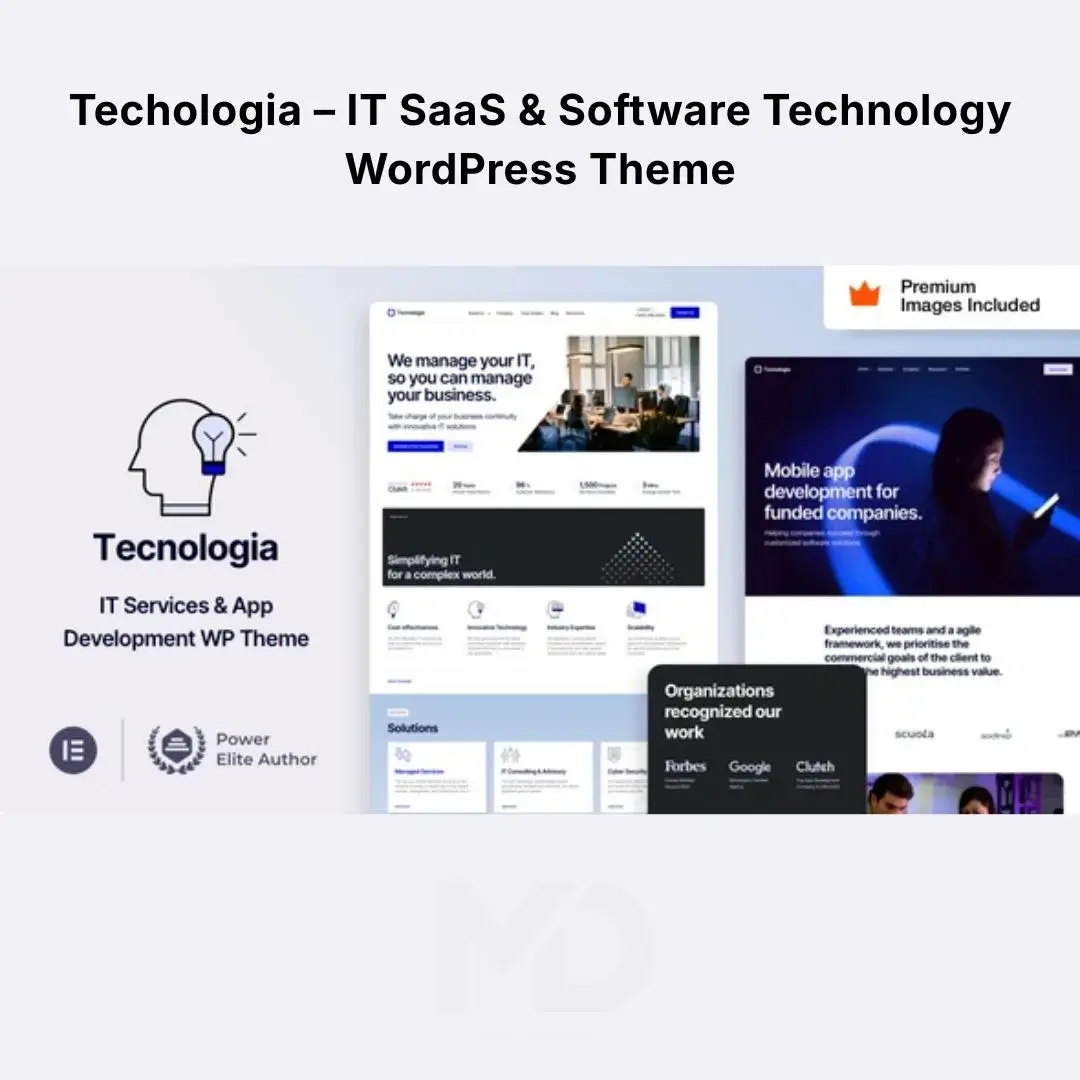


Technologia – IT SaaS & Software Technology WordPress Theme
Build a Modern Website for Your SaaS, Software, AI, or Technology Business
Technology businesses need websites that communicate innovation, reliability, and professionalism within seconds. A generic corporate website can make even a great software product look ordinary.
Techologia – IT SaaS & Software Technology WordPress Theme provides a modern, technology-focused foundation for creating professional websites for SaaS companies, software startups, IT service providers, app development companies, AI businesses, cybersecurity agencies, digital agencies, and technology-focused brands.
The theme is built around the Elementor ecosystem and uses Elementor Pro widgets extensively, allowing you to visually create and customize layouts without depending on a complex theme options panel. The original product documentation also highlights SaaS, AI, software, app, startup, agency, IT, cybersecurity, and technology use cases.
Why Choose Techologia?
Launching a technology website from scratch often means solving several problems at once:
- How should your SaaS product be presented?
- How do you explain complex technology simply?
- How can you create a professional product landing page?
- How do you showcase features and benefits?
- How do you build pricing sections?
- How can you create responsive layouts without coding?
- How do you present your software company professionally?
Techologia gives you a structured starting point so you can focus on your product, services, content, and customers rather than designing every website section from zero.
Key Features
Modern SaaS & Technology Design
Techologia is designed specifically around modern technology businesses.
It is suitable for:
- SaaS companies
- Software companies
- AI startups
- AI product websites
- IT service providers
- App development agencies
- Cybersecurity companies
- Digital agencies
- Technology startups
- Software development companies
- IT consultants
- Digital transformation businesses
- Technology service providers
The design language is modern and professional, making it easier to position your company as a credible technology brand.
Elementor & Elementor Pro Integration
Techologia is deeply integrated with Elementor and Elementor Pro.
Rather than simply claiming Elementor compatibility, the theme is built using Elementor Pro widgets, allowing you to work within a familiar visual editing environment. The original documentation specifically states that Elementor Pro is required for the demo content importer and theme setup.
You can visually customize:
- Headings
- Text
- Images
- Buttons
- Sections
- Columns
- Backgrounds
- Spacing
- Typography
- Responsive settings
- Headers
- Footers
- Popups
- Forms
- Menus
This makes Techologia particularly useful for users who want extensive design control without manually editing theme code.
SaaS Product Showcase
A SaaS website needs to explain the product clearly and move visitors toward registration, purchasing, or requesting a demo.
Use the available layouts to present:
- Product overview
- Key features
- Benefits
- Screenshots
- Product workflow
- Pricing
- Integrations
- Customer testimonials
- FAQs
- Call-to-action sections
A well-structured SaaS landing page can help visitors understand your product without overwhelming them with technical information.
AI & Artificial Intelligence Websites
The theme is also positioned for AI-focused businesses and products.
Create websites for:
- AI SaaS platforms
- AI writing tools
- AI automation products
- Machine learning startups
- AI consulting companies
- AI development agencies
- AI-powered applications
- Generative AI products
Use dedicated sections to explain what your AI product does, how it works, and why customers should use it.
Software Company Websites
Present your software business with a professional online presence.
Create dedicated pages for:
- Software products
- Development services
- Custom software
- Mobile applications
- Web applications
- Enterprise solutions
- Cloud services
- Technical consulting
This gives you the flexibility to promote both products and services from the same website.
App Landing Pages
If you have a mobile or web application, use the theme to create a dedicated app landing page.
Highlight:
- App features
- Screenshots
- Benefits
- User experience
- Supported platforms
- Pricing
- Download links
- Registration
- Customer testimonials
A dedicated landing page helps visitors understand the application before they decide to download or subscribe.
IT Services Website
Technology agencies can use Techologia to organize multiple services into clear sections.
For example:
Web Development
Promote custom websites and web applications.
App Development
Showcase iOS, Android, and cross-platform development.
Software Development
Promote custom software solutions.
Cloud Services
Explain your cloud infrastructure and services.
IT Consulting
Present your consulting expertise.
Cybersecurity
Highlight security audits, protection, monitoring, and compliance services.
Cybersecurity-Focused Sections
Cybersecurity businesses need to establish credibility and communicate complex services clearly.
Techologia provides a suitable visual foundation for presenting:
- Cybersecurity services
- Security consulting
- Threat protection
- Risk management
- Security assessments
- Data protection
- Compliance services
- Security awareness
Use clear explanations, trust signals, FAQs, case studies, and calls to action to help potential clients understand your offering.
Elementor Pro Header & Footer Builder
Build your headers and footers directly using Elementor Pro.
Create custom headers containing:
- Logo
- Navigation
- Services
- Product links
- Pricing
- Contact buttons
- Login links
- Calls to action
Create professional footers containing:
- Company information
- Navigation
- Services
- Social links
- Contact details
- Legal pages
- Newsletter sections
The original theme documentation confirms that headers and footers are built using Elementor Pro.
Dynamic Content Layouts
Techologia uses Elementor Pro for dynamic layouts, allowing you to customize important WordPress templates.
This includes layouts for:
- Blog posts
- Products
- Archives
- Search results
- 404 pages
- Maintenance pages
- Coming Soon pages
This means you can create a consistent visual identity throughout the entire website instead of manually designing every individual template.
Mega Menu Support
Technology companies often have many products, services, and resources.
Use mega menus to organize large navigation structures.
For example:
Solutions
- SaaS Development
- App Development
- Cloud Services
- Cybersecurity
- IT Consulting
Products
- Product A
- Product B
- Product C
Resources
- Blog
- Documentation
- Tutorials
- FAQs
Mega menus can make large technology websites easier to navigate.
Elementor Pro Forms
Create professional forms directly through Elementor Pro.
Use them for:
- Contact requests
- Demo requests
- Consultation bookings
- Sales inquiries
- Newsletter subscriptions
- Service inquiries
- Support requests
For a SaaS business, a strong Request a Demo or Start Free Trial form can be particularly valuable.
Elementor Pro Popups
Use popup functionality for conversion-focused content.
Examples include:
- Free trial offers
- Newsletter signup
- Demo requests
- Promotional offers
- Lead-generation forms
- Product announcements
Avoid excessive popups; use them strategically around genuine customer actions.
Responsive Design
Your technology website needs to work across all screen sizes.
Techologia provides responsive layouts suitable for:
- Desktop computers
- Laptops
- Tablets
- Smartphones
Elementor Pro also provides responsive controls, allowing you to adjust layouts for different devices. The original documentation highlights mobile/tablet controls and customized breakpoints.
RTL Support
Techologia includes RTL support, making it suitable for websites using right-to-left languages.
This is particularly useful for businesses targeting markets using:
- Arabic
- Urdu
- Persian
- Hebrew
You can create a technology website for international audiences while maintaining an appropriate right-to-left layout.
Ready-Made Demo Content
The theme includes demo content designed to help you establish your website structure faster.
Because Elementor Pro is required for the demo importer and setup, make sure Elementor Pro is available and properly configured before attempting to import the complete demo.
Once imported, replace the demo content with your own:
- Logo
- Brand name
- Product information
- Services
- Images
- Pricing
- Contact details
- Testimonials
- Company information
Premium Demo Images
The original product listing states that premium stock images are included in the package and that demo images are supplied with the demo content for use in projects under the applicable product terms.
This can save time when initially building your website.
For a production website, however, replace generic demo imagery with visuals that accurately represent your own company and products.
Clean Elementor-Based Workflow
One of the biggest advantages of Techologia is its Elementor-first approach.
Instead of learning a complicated theme options panel, much of the visual customization can be handled through:
WordPress + Elementor + Elementor Pro
The original documentation specifically promotes this workflow and notes that Elementor Pro’s Global Styles can function as the primary design-control system.
Global Styles
Use Elementor Pro’s global styling system to maintain consistency across your website.
Define:
- Primary colors
- Secondary colors
- Typography
- Button styles
- Headings
- Text styles
- Spacing
This is particularly useful for SaaS and technology companies because consistent branding can make the website look significantly more professional.
Custom Responsive Breakpoints
Technology websites often contain complex layouts, dashboards, product screenshots, and feature comparisons.
Elementor Pro’s responsive controls and custom breakpoints allow you to fine-tune the appearance of your pages across different screen sizes.
Blog & Content Marketing
Use the blog to attract organic traffic and demonstrate your expertise.
Create content around:
- SaaS
- AI
- Software development
- Cybersecurity
- IT services
- Cloud computing
- Automation
- Technology trends
- Product tutorials
- Industry insights
For example:
“How AI Automation Can Reduce Repetitive Business Tasks”
can attract potential customers who are researching AI automation before purchasing a solution.
SEO-Friendly Website Structure
Techologia provides a modern foundation, but SEO results depend heavily on your content, technical configuration, and overall SEO strategy.
Optimize your pages around specific search intent.
Primary Keywords
- SaaS WordPress Theme
- Software Technology WordPress Theme
- IT Services WordPress Theme
- Technology WordPress Theme
Supporting Keywords
- AI Startup WordPress Theme
- Software Company WordPress Theme
- App Development WordPress Theme
- Cybersecurity WordPress Theme
- IT Agency WordPress Theme
- SaaS Company Website
- Technology Startup WordPress Theme
- Software Development Agency Theme
- AI Technology WordPress Theme
Problem-Solving Benefits
Problem: Your SaaS product is difficult to explain.
Solution: Use structured product sections to break complex technology into understandable features, benefits, screenshots, and use cases.
Problem: Your technology company looks outdated.
Solution: Use a modern SaaS and technology-focused visual design rather than a generic corporate layout.
Problem: You need to create landing pages quickly.
Solution: Start with the available layouts and customize them using Elementor.
Problem: You don’t want to code every page.
Solution: Use Elementor’s visual editor for standard design and layout customization.
Problem: Your website has multiple services.
Solution: Create dedicated service pages and organize them through structured navigation and mega menus.
Problem: You need a multilingual technology website.
Solution: Use RTL support and compatible multilingual tools to adapt your website to international markets.
Ideal For
Techologia is an excellent starting point for:
- SaaS startups
- AI startups
- Software companies
- IT agencies
- App development companies
- Cybersecurity businesses
- Technology consultants
- Digital agencies
- Cloud service providers
- Software-as-a-Service products
- IT service companies
- Technology startups
- Web application companies
- Digital transformation agencies
Installation Guide
Step 1: Install WordPress
Set up a clean WordPress installation on your hosting account.
For best results, use a modern PHP/MySQL environment and sufficient server resources for Elementor and demo importing.
Step 2: Install the Theme
Go to:
WordPress Dashboard → Appearance → Themes → Add New → Upload Theme
Upload the Techologia ZIP file and click:
Install Now → Activate
Step 3: Install Required Plugins
After activating the theme, install the plugins required by the theme.
At minimum, the complete demo/setup workflow requires:
- Elementor
- Elementor Pro
The original product documentation specifically states that Elementor Pro is required for demo importing and theme setup.
Step 4: Configure Elementor
Activate Elementor and Elementor Pro, then review:
Elementor → Settings
Make sure the required post types are enabled if you intend to build custom content with Elementor.
Step 5: Import Demo Content
Open the theme’s demo/import functionality and follow the setup instructions.
Allow the process to finish completely before editing the imported pages.
Step 6: Configure Global Styles
Open Elementor’s global settings and establish your:
- Brand colors
- Fonts
- Heading styles
- Button styles
- General spacing
Step 7: Replace Demo Content
Update:
- Logo
- Company name
- Product information
- Services
- Images
- Pricing
- Contact information
- Social links
Step 8: Configure Header & Footer
Open the relevant Elementor templates and customize your navigation, branding, contact information, and calls to action.
Step 9: Build Your Main Pages
At minimum, consider creating:
- Home
- About
- Services
- Products
- Pricing
- Case Studies
- Blog
- FAQ
- Contact
For SaaS businesses, also consider:
- Features
- Integrations
- Security
- Request a Demo
- Free Trial
Step 10: Test Your Website
Before launch, test:
- Desktop layout
- Tablet layout
- Mobile layout
- Navigation
- Forms
- Buttons
- Contact information
- Popups
- Blog
- Search
- 404 page
- Page speed
How to Use Techologia for a SaaS Business
A strong SaaS homepage can follow this structure:
1. Hero Section
Clearly explain:
What your product does + who it helps + the desired action
Example:
“Automate Your Customer Support With AI”
Then provide:
Start Free Trial
or
Request a Demo
2. Trust Section
Show:
- Customer logos
- User numbers
- Reviews
- Security certifications, if applicable
3. Product Explanation
Explain the problem your software solves.
4. Key Features
Show the most valuable features rather than listing every technical specification.
5. Product Screenshots
Give potential customers a visual understanding of the interface.
6. Benefits
Explain how the product saves time, reduces costs, improves productivity, or solves a specific business problem.
7. Pricing
Present plans clearly.
8. FAQ
Answer objections before customers contact your sales team.
9. Final CTA
End with a clear action:
Start Your Free Trial
or
Book a Demo
How to Use Techologia for an IT Agency
For an IT agency, structure the website around services rather than a SaaS product.
Recommended structure:
Home → Services → Individual Service Pages → Case Studies → About → Blog → Contact
Create dedicated pages for:
- Web Development
- Mobile App Development
- Custom Software
- Cloud Solutions
- Cybersecurity
- IT Consulting
- UI/UX Design
Each service page should explain:
Problem → Solution → Process → Benefits → Results → CTA
This approach makes the website more useful for both customers and search engines.
Performance & Maintenance Recommendations
A theme alone cannot guarantee a fast website. Your final performance depends on hosting, plugins, images, scripts, fonts, and configuration.
For a professional deployment:
- Use quality WordPress hosting.
- Keep WordPress updated.
- Keep Elementor and Elementor Pro compatible with your theme version.
- Optimize images.
- Use caching.
- Consider a CDN.
- Remove unused plugins.
- Avoid excessive third-party scripts.
- Monitor Core Web Vitals.
- Test major updates on staging first.
Key Features at a Glance
- SaaS-focused WordPress design
- IT services layouts
- Software company layouts
- AI-focused website sections
- App landing page layouts
- Technology startup design
- Cybersecurity-focused sections
- Elementor integration
- Elementor Pro integration
- Elementor Pro-based theme workflow
- Global styling controls
- Responsive editing
- Custom breakpoints
- Elementor header builder
- Elementor footer builder
- Mega menus
- Dynamic content layouts
- Blog layouts
- Product layouts
- Archive templates
- Search results layouts
- 404 page layouts
- Maintenance mode layouts
- Coming Soon layouts
- Elementor forms
- Elementor popups
- RTL support
- Responsive design
- Translation-ready workflow
- WPML compatibility
- Demo content
- Premium demo images
- Extensive documentation
- Video tutorials
- Technology-focused design
- SaaS-ready structure
- AI-ready layouts
- App development layouts
- IT agency layouts
The original product listing confirms Elementor/Elementor Pro compatibility, RTL support, Elementor-built headers and footers, dynamic layouts, mega menus, forms, popups, responsive controls, WPML compatibility, and its technology/SaaS/AI positioning.
Important Compatibility Note
The original product documentation states that Elementor Pro is required for the demo content importer and theme setup. If you are using a GPL-distributed version, availability of Elementor Pro features, automatic updates, developer services, cloud-connected functionality, or other externally licensed services can differ from the original marketplace package. Test the specific package and version you are distributing before promising customers that every developer-connected feature is available.
Copyright & Trademark Disclaimer
- WordPress®, Elementor®, Elementor Pro®, WooCommerce®, WPML®, and other product names, logos, and trademarks are the property of their respective owners.
- This product is distributed under the GNU General Public License (GPL) where applicable.
- MDDigitals is not affiliated with, endorsed by, sponsored by, or associated with the original developer, VamTam, Envato/ThemeForest, or any other trademark owner.
- All third-party copyrights, trademarks, logos, and intellectual property rights remain the property of their respective owners.





Reviews
There are no reviews yet