
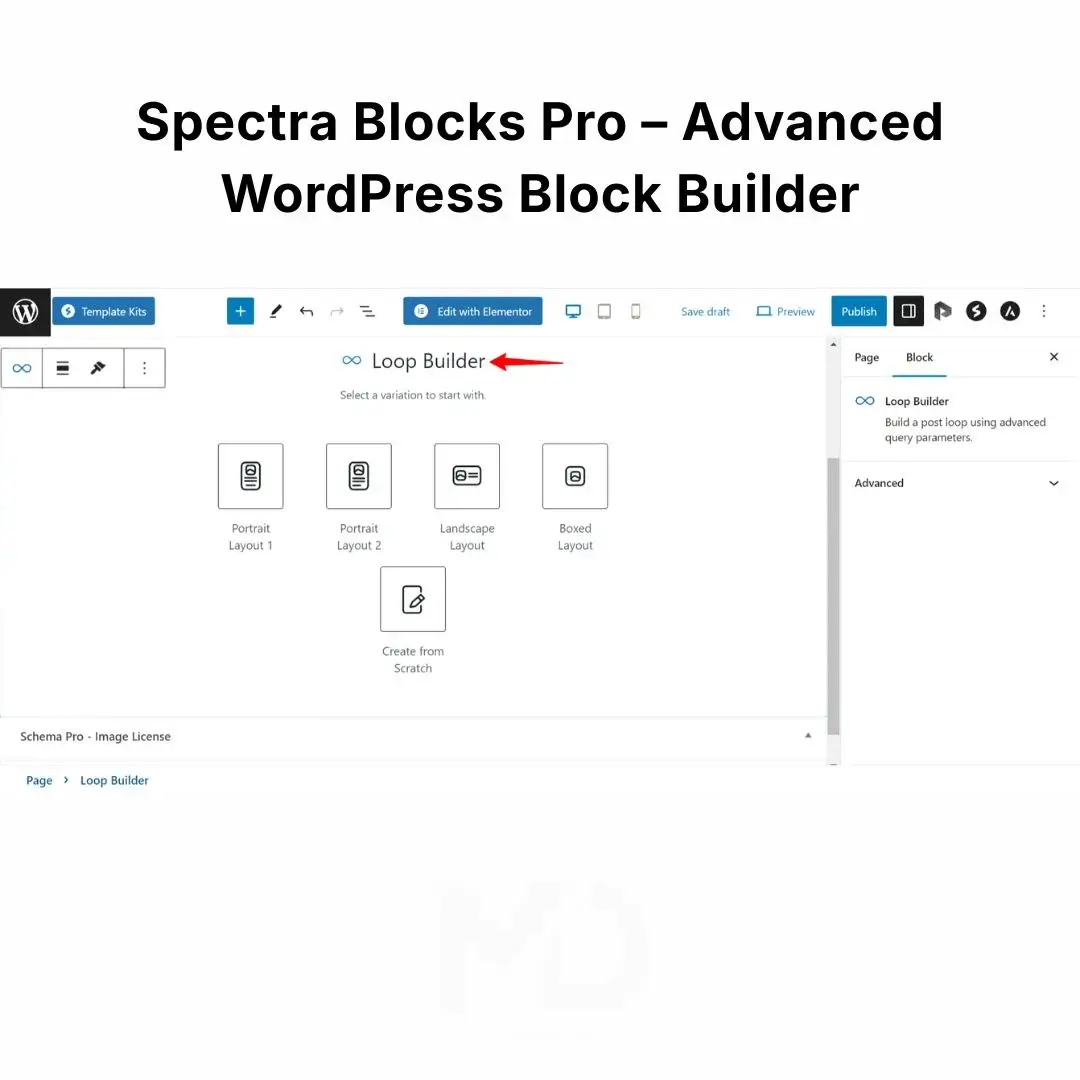


Spectra Blocks Pro – Advanced WordPress Block Builder
Build faster, more flexible, and more professional WordPress websites directly inside the native WordPress Block Editor. Spectra Blocks Pro extends the free Spectra Blocks plugin with advanced blocks, dynamic content capabilities, powerful design controls, and professional website-building tools—without requiring a traditional third-party page builder.
Whether you’re creating business websites, landing pages, blogs, portfolios, membership websites, WooCommerce projects, or client websites, Spectra Blocks Pro gives you additional control over layouts, content, interactions, and responsive design.
Important: Spectra Blocks Pro is the Pro companion for Spectra Blocks, not Spectra Legacy. The two Pro plugins are separate and are not interchangeable.
Why Choose Spectra Blocks Pro?
WordPress’s native Block Editor is fast and flexible, but its standard blocks can sometimes feel limiting when you’re trying to create sophisticated layouts.
Spectra Blocks Pro expands the Block Editor with advanced building capabilities so you can create more polished pages without relying on custom code for every design requirement.
Instead of switching between multiple editors and complicated interfaces, you can work directly inside the familiar WordPress editor.
Perfect for:
- Business websites
- Agency websites
- Freelance projects
- Landing pages
- Blogs and magazines
- Portfolio websites
- Service websites
- Membership websites
- WooCommerce websites
- Client projects
- Custom WordPress websites
Key Features
Advanced Gutenberg & WordPress Block Editor Experience
Spectra Blocks Pro is designed specifically for the modern WordPress Block Editor.
You can add, arrange, customize, and style blocks directly from the WordPress editor while maintaining the flexibility of WordPress’s native content system.
This makes it particularly useful if you want a modern website-building workflow without depending entirely on traditional page builders.
Advanced Blocks for Professional Websites
Expand your design possibilities with additional blocks and advanced functionality.
Depending on the version and enabled features, Pro capabilities can help you create:
- Dynamic content sections
- Advanced forms
- Interactive layouts
- Advanced content listings
- Sliders and carousels
- Tabs
- Accordions
- Popups/modals
- Registration interfaces
- Countdown sections
- Dynamic post layouts
- Advanced calls to action
- Professional content sections
For example, the Spectra Blocks documentation describes advanced blocks such as Loop Builder, which can display dynamic posts and custom post types with filtering, sorting, and pagination.
Dynamic Content
One of the major advantages of the Pro version is the ability to work with dynamic information rather than creating every piece of content manually.
Dynamic content can be useful when creating:
- Blog layouts
- Post archives
- Author sections
- Custom content directories
- Client websites
- Dynamic landing pages
- Custom post type displays
This can significantly reduce repetitive work when managing larger WordPress websites.
Loop Builder for Dynamic Content
Create flexible post and content listings without manually designing every item.
The Loop Builder supports dynamic post querying and can work with posts, pages, and custom post types. It also provides filtering, sorting, and pagination capabilities.
Practical examples:
Blog website:
Display posts automatically in a customized grid.
Directory website:
Display custom entries with filters.
News website:
Create dynamic article listings.
Portfolio:
Automatically display projects from a custom post type.
Advanced Forms & Registration
Spectra Blocks Pro includes functionality for creating more advanced form-based interfaces.
For example, its Registration Form block can create user registration forms with fields such as:
- Username
- Password
- Confirm password
- First name
- Last name
- Terms and conditions
- Login links
- reCAPTCHA components
The form components can be customized within the block structure.
This makes the Pro tools useful for membership, community, and user-account websites.
Responsive Design Controls
Your website needs to work properly on more than just desktop computers.
Spectra provides responsive controls that allow you to customize elements for different screen sizes.
You can adjust things such as:
- Typography
- Spacing
- Dimensions
- Alignment
- Layout
- Borders
- Styling
This helps you create layouts that look better across desktop, tablet, and mobile devices.
Practical use
Create a large desktop heading while reducing the font size on mobile.
Use different spacing values for desktop and mobile.
Adjust columns and layouts to prevent content from becoming cramped on smaller screens.
Advanced Typography & Styling
Take greater control over how your website looks without writing custom CSS for every adjustment.
Depending on the block, you can control:
- Font size
- Font weight
- Line height
- Letter spacing
- Text colors
- Background colors
- Borders
- Border radius
- Shadows
- Spacing
- Alignment
- Hover effects
This makes it easier to maintain a consistent visual style throughout your website.
Interactive Elements
Create engaging website sections using interactive blocks such as:
- Tabs
- Sliders
- Accordions
- Modals
- Interactive content sections
For example, the Tabs block can contain other WordPress blocks inside each tab, allowing you to create everything from simple text sections to more complex layouts.
The Slider block can also be used for images, testimonials, product showcases, and other sequential content.
Countdown Features
Countdown functionality can be useful for:
- Product launches
- Promotional campaigns
- Event registrations
- Limited-time offers
- Website announcements
- Webinar registrations
Pro functionality includes an evergreen countdown option that can provide an individualized countdown for visitors.
Animation & Visual Effects
Add subtle movement and visual effects to important website elements.
Animations can be useful for:
- Hero sections
- Calls to action
- Feature sections
- Product presentations
- Image galleries
- Content reveals
Use animations carefully to enhance the user experience without unnecessarily slowing down or distracting from the page.
Design Library & Ready-to-Use Patterns
Instead of building every section from a blank page, you can use pre-designed patterns and customize them to match your project.
The Spectra Design Library provides ready-made sections such as:
- Hero sections
- Features
- Testimonials
- Pricing
- Contact sections
You can insert a design and then replace the text, images, colors, links, and other content.
This can dramatically speed up the initial website-building process.
Build Websites Without Coding
One of the biggest advantages of a block-based workflow is that you don’t need to write custom code for every layout.
You can visually create:
Containers → Sections → Columns → Content → Buttons → Forms → Interactive Elements
and customize their appearance from the WordPress editor.
This is particularly useful for freelancers and developers who need to create multiple websites efficiently.
Performance-Focused WordPress Workflow
Spectra’s documentation describes its architecture as performance-oriented, including selective loading of styles and a modern React-based architecture.
However, overall website speed still depends on your:
- WordPress hosting
- Theme
- Images
- Plugins
- Caching
- Fonts
- Third-party scripts
- Website configuration
Using a performance-oriented block builder does not automatically guarantee a high PageSpeed score.
RTL & Multilingual Support
Spectra’s documentation includes support for Right-to-Left layouts, making it useful for websites using languages such as:
- Urdu
- Arabic
- Persian
- Hebrew
RTL-aware controls can help with alignment, spacing, button positioning, and content direction.
This can be particularly useful when creating websites for audiences using RTL languages.
How to Install Spectra Blocks Pro
Important: Spectra Blocks Pro works with the free Spectra Blocks plugin. It should not be installed as a replacement for Spectra Blocks.
Step 1 — Install Spectra Blocks
From your WordPress dashboard:
Plugins → Add New
Search for:
Spectra Blocks
Install and activate the free Spectra Blocks plugin.
The official documentation confirms that Spectra Blocks is the free foundation plugin and is available through WordPress.org.
Step 2 — Upload Spectra Blocks Pro
Go to:
Plugins → Add New → Upload Plugin
Upload the provided Spectra Blocks Pro ZIP file.
Click:
Install Now → Activate
Step 3 — Verify Activation
After activation, confirm that:
- Spectra Blocks is active
- Spectra Blocks Pro is active
- Pro blocks/features are available inside the WordPress Block Editor
The official installation workflow similarly requires both the free Spectra Blocks plugin and Spectra Blocks Pro to be installed and active.
Step 4 — Start Building
Go to:
Pages → Add New
or edit an existing page.
Click the + Block Inserter and look for the Spectra blocks.
Add your desired block and customize it using the available settings.
How to Use Spectra Blocks Pro
1. Create or edit a page
Open a WordPress page or post using the Block Editor.
2. Add a Spectra block
Click the + button and search for the required block.
3. Build your layout
Use Container and other layout tools to establish your page structure.
4. Add content
Insert:
- Text
- Images
- Buttons
- Icons
- Forms
- Galleries
- Interactive elements
- Dynamic content
5. Customize the design
Use the block settings to modify:
- Typography
- Colors
- Spacing
- Borders
- Shadows
- Layout
- Responsive settings
6. Optimize for mobile
Switch between device-specific controls and check how your page behaves on:
Desktop → Tablet → Mobile
7. Preview and publish
Preview the page, check your responsive layout, test buttons/forms, and publish when everything is ready.
Spectra Blocks vs Spectra Blocks Pro
| Feature | Spectra Blocks | Spectra Blocks Pro |
|---|---|---|
| WordPress Block Editor | ✓ | ✓ |
| Core block-building workflow | ✓ | ✓ |
| Advanced design controls | ✓ | ✓ |
| Responsive controls | ✓ | ✓ |
| Design patterns | ✓ | ✓ |
| Advanced Pro functionality | — | ✓ |
| Dynamic content capabilities | — | ✓ |
| Advanced forms/features | Limited | ✓ |
| Additional Pro blocks | — | ✓ |
Note: Exact features can vary by current plugin version, so always check the version-specific documentation before promising a particular Pro feature. Spectra’s current documentation distinguishes Spectra Blocks Pro from the older Spectra Pro Legacy product.
Who Is Spectra Blocks Pro For?
WordPress Beginners
Create professional layouts without needing to learn extensive CSS or PHP.
Freelancers
Build client websites faster using reusable blocks and responsive design controls.
Agencies
Develop repeatable website structures and customize them for different clients.
Developers
Use WordPress’s native block architecture while extending it with additional functionality.
WooCommerce & Business Website Owners
Create more engaging product, service, promotional, and conversion-focused pages.
Important Compatibility Note
Spectra Blocks Pro is specifically designed to work with Spectra Blocks.
Do not confuse it with Spectra Pro Legacy.
The official Spectra documentation states that Spectra Blocks and Spectra Legacy are separate plugins, and each has its own matching Pro companion:
Spectra Blocks → Spectra Blocks Pro
Spectra Legacy → Spectra Pro Legacy
This distinction is important when installing the product.
Frequently Asked Questions
Is Spectra Blocks Pro a standalone plugin?
It is the Pro companion to the free Spectra Blocks plugin. You should install Spectra Blocks alongside Spectra Blocks Pro.
Do I need Spectra Blocks?
Yes. Spectra Blocks Pro is designed to work with the free Spectra Blocks plugin.
Can I use Spectra Blocks Pro with Spectra Legacy?
No. Spectra Blocks Pro and Spectra Pro Legacy are separate companions for their respective free plugins.
Can I use it with my existing WordPress theme?
Spectra is designed to work with standard WordPress themes.
Is coding required?
No. The primary workflow is visual and takes place inside the WordPress Block Editor, although developers can use additional customization options when needed.
Product Benefits at a Glance
Build Faster
Create complete website sections without designing everything from scratch.
Design More Freely
Get advanced controls for typography, spacing, colors, borders, layouts, and effects.
Create Dynamic Websites
Use Pro functionality to build dynamic content and advanced post listings.
Improve Mobile Layouts
Fine-tune your website for desktop, tablet, and mobile devices.
Create Interactive Sections
Use tabs, sliders, countdowns, forms, and other interactive components.
Work Inside WordPress
Build directly within the native WordPress Block Editor instead of relying on a separate page-building interface.
Copyright & Trademark Disclaimer
Spectra®, Spectra Blocks®, Astra®, Brainstorm Force®, WordPress®, and other referenced product names and trademarks are the property of their respective owners.
This product is provided as a GPL-licensed software distribution where applicable and is not affiliated with, endorsed by, sponsored by, or officially connected with Brainstorm Force or the original developer.
MD Digitals is an independent distributor and does not represent itself as the original developer or trademark owner. Product names are used solely to identify compatibility and the software being provided.
Please verify the specific version, compatibility, and included features before installation, particularly when using Spectra Blocks Pro alongside Spectra Blocks rather than Spectra Legacy.


Reviews
There are no reviews yet