
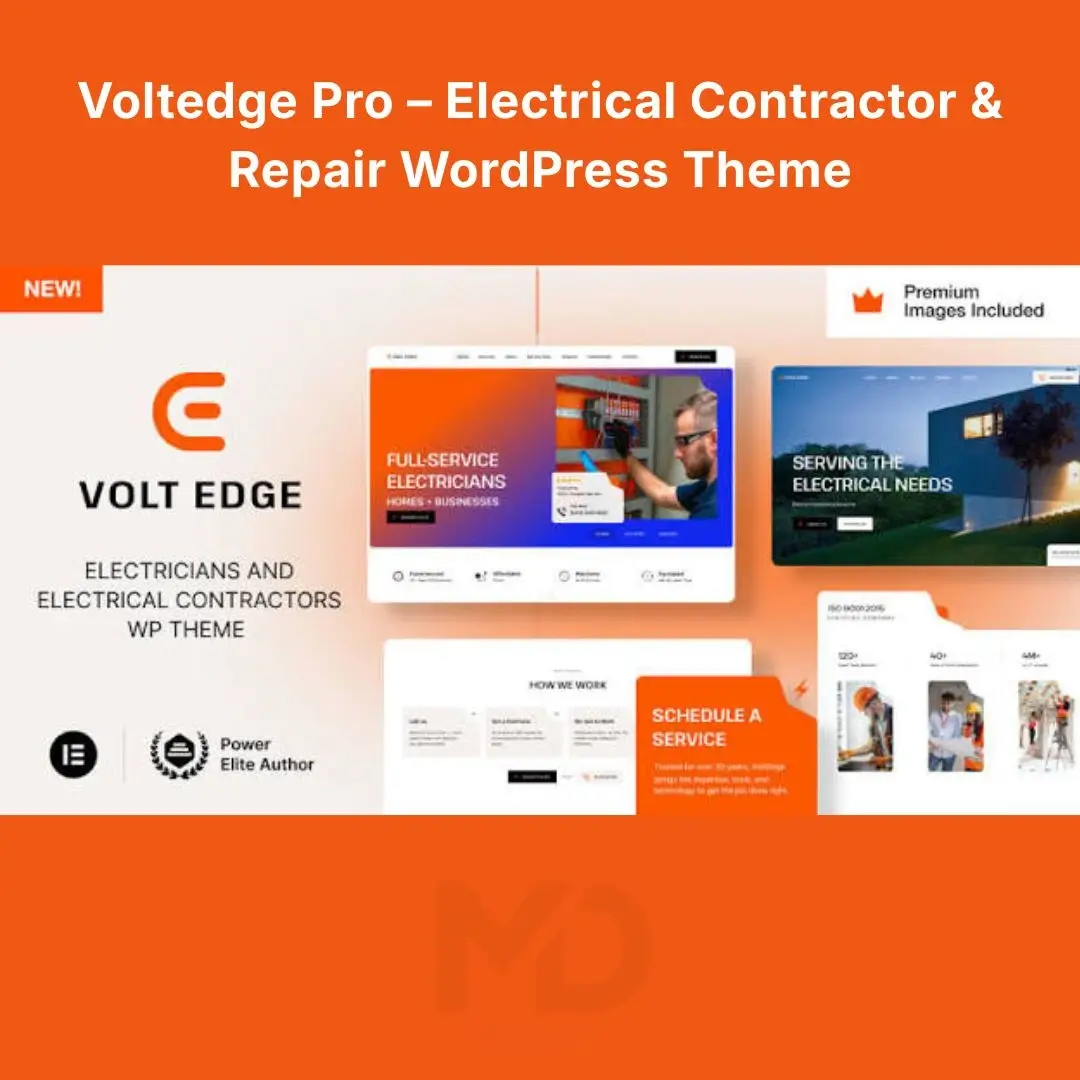


Voltedge Pro – Electrical Contractor & Repair WordPress Theme
Build a professional website for your electrical contracting business, electrician services, or electrical repair company with Voltedge Pro – Electrical Contractor & Repair WordPress Theme.
Designed for electrical professionals who want to strengthen their online presence, this theme provides a foundation for presenting your services, showcasing completed projects, highlighting your expertise, and encouraging potential customers to request a quote or schedule a service.
Whether you run a residential electrician business, commercial electrical contracting company, industrial electrical service, or electrical maintenance team, a professional website can help customers understand what you offer and how to contact you.
Turn your website into a professional showcase for your electrical services. Present your capabilities clearly, build confidence with potential customers, and make it easier for people to take the next step toward hiring your business.
Create a Professional Website for Your Electrical Business
Customers looking for an electrician often want answers to a few important questions:
-
What electrical services do you provide?
-
Do you handle residential, commercial, or industrial projects?
-
Can I see examples of your previous work?
-
How can I request a quotation or arrange a visit?
-
Why should I trust your company with my electrical project?
A well-organized business website helps answer these questions before a customer even contacts you.
Voltedge Pro provides a specialized website design foundation for electrical contractors, repair technicians, and service companies. Customize your pages to communicate your expertise, explain your services, highlight your completed projects, and make your contact information easy to find.
Use it to establish a professional online presence without having to design every page from scratch.
Key Features That Help Your Business Grow
1. Professional Electrical Services Website Design
Create a website tailored to the needs of electrical contractors, repair technicians, and electrical service providers.
Present your business information, service categories, project highlights, and contact details in a clear, professional format.
How it helps: Give potential customers a better understanding of your business before they request a service or quotation.
2. Elementor Drag-and-Drop Website Builder
Customize supported website layouts using Elementor’s visual editing interface. The original VoltEdge theme listing specifies compatibility with both Elementor and Elementor Pro.
You can use the visual editor to adjust page content, headings, images, spacing, buttons, and other supported elements.
How it helps: Update your website as your services change without having to manually code every page.
Important: Elementor Pro is required for the original theme’s demo importer and setup process. Confirm that your installation includes access to the required version.
3. Dedicated Electrical Service Pages
Organize your service offerings into clear categories so customers can quickly find the help they need.
You can create pages for:
-
Residential electrical installation and repairs
-
Commercial electrical contracting
-
Industrial electrical services
-
Electrical inspections and maintenance
-
Circuit breaker and electrical panel upgrades
-
Lighting installation
-
EV charging station installation
-
Smart home and automation systems
-
Solar and backup power solutions
-
Low-voltage electrical systems
These are suggested ways to organize your business website, not a claim that every service has a separate prebuilt page.
How it helps: Explain each service clearly, answer common customer questions, and direct visitors toward a quotation or contact form.
4. Showcase Completed Projects
Electrical customers often want confidence that a contractor has relevant experience.
Use your website to feature completed installations, commercial projects, lighting upgrades, electrical maintenance work, and other projects that demonstrate your capabilities.
For each project, consider including:
-
Project overview
-
Customer requirements
-
Services provided
-
Photos of completed work
-
Challenges addressed
-
Final outcome
How it helps: Turn your portfolio into evidence of your experience rather than simply listing services.
5. Responsive Design for Mobile Visitors
Customers may search for electricians while away from their computers. A responsive website helps them browse your services and contact details on different screen sizes.
The original theme listing identifies its layout as responsive.
How it helps: Make it easier for potential customers to read service information, navigate pages, and find your contact options on smartphones and tablets.
6. Custom Headers, Footers & Navigation
The original theme uses Elementor Pro to build its headers and footers, allowing these areas to be customized through the visual editing workflow.
Use these sections to display your company logo, navigation links, phone number, business hours, service areas, and other relevant information.
How it helps: Keep important business information accessible throughout the website.
7. Contact Forms & Quote Requests
Make it easy for visitors to express interest in your services.
You can create a contact page or inquiry form that collects useful information such as:
-
Customer name
-
Phone number or email
-
Type of electrical service
-
Property or project location
-
Description of the issue
-
Preferred contact time
The original theme listing includes Elementor Pro form functionality.
How it helps: Collect the information you need to follow up with potential customers. Test form delivery and spam protection before publishing.
8. Customizable Colors, Typography & Global Styles
Maintain a consistent visual identity across your pages using Elementor Pro’s global styling tools and responsive design controls.
Customize the website to match your company’s logo, brand colors, typography, and preferred design style.
How it helps: Build a recognizable business identity without having to style every page independently.
9. Blog & Educational Content
Use WordPress posts to share practical information that helps customers understand your services.
Potential topics include:
-
Signs that electrical wiring needs professional inspection
-
Benefits of routine electrical maintenance
-
Preparing a property for an electrical upgrade
-
Choosing lighting for commercial spaces
-
Questions to ask before hiring an electrical contractor
-
EV charging installation considerations
How it helps: Provide useful information to customers and support your long-term SEO strategy through relevant content.
10. Dynamic Layouts, Mega Menus & Pop-Ups
The original theme listing identifies dynamic layouts for blog posts, product pages, archives, search results, and other templates, along with mega menus and pop-ups built using Elementor Pro.
These tools can help organize larger websites, promote specific services, or direct visitors toward important pages.
How it helps: Expand your website beyond a simple homepage as your business grows.
11. RTL & Multilingual Website Support
The original listing includes right-to-left (RTL) support and compatibility with WPML.
This can be useful if you want to serve audiences who use right-to-left languages or build a multilingual business website.
How it helps: Adapt your website to different language and audience requirements, subject to the relevant plugin and configuration.
12. Theme Documentation & Learning Resources
The original product listing advertises a setup guide and 23 HD video tutorials for beginners.
These resources can help you understand the setup process and customize supported features.
How it helps: Follow a documented workflow instead of relying entirely on trial and error.
What Problems Does Voltedge Pro Help Solve?
Problem: Your electrical business has no professional website.
Solution: Start with a specialized WordPress theme and adapt the content to your company, services, and target customers.
Problem: Customers cannot easily understand your services.
Solution: Create organized service pages that explain the work you perform and the types of projects you handle.
Problem: You struggle to demonstrate your experience.
Solution: Showcase completed projects, relevant photographs, and genuine customer testimonials.
Problem: Customers have difficulty requesting a quotation.
Solution: Add clear contact buttons, phone information, and a working inquiry form.
Problem: Updating your website requires too much technical work.
Solution: Use Elementor and the supported visual editing controls to make routine content and layout changes.
Problem: Your website needs to work across devices.
Solution: Customize and test the responsive layouts on mobile, tablet, and desktop screens.
Who Should Use This Theme?
-
Electrical contractors: Present commercial and residential contracting services.
-
Electricians: Promote installation, troubleshooting, and repair services.
-
Electrical maintenance companies: Explain ongoing maintenance and inspection offerings.
-
Industrial electrical businesses: Showcase industrial projects and specialist capabilities.
-
EV charging installers: Build a website focused on charging station installation services.
-
Solar and backup power providers: Present relevant installation and power-system services.
-
Smart home specialists: Promote automation and low-voltage solutions.
-
Electrical engineering companies: Build a professional online presence around technical expertise and project work.
Installation Guide
Follow these steps to install the theme on your WordPress website.
Step 1: Prepare Your WordPress Website
Before installing the theme, create a full backup of your website files and database.
If your website is already live, consider testing the installation on a staging site to avoid disrupting existing pages.
Step 2: Extract the Downloaded Package
Download the theme package provided to you.
If it contains documentation, demo files, plugins, or other folders, extract it on your computer and locate the actual installable theme ZIP file.
Do not upload the entire package if WordPress expects a separate theme ZIP.
Step 3: Upload the Theme
In your WordPress dashboard, navigate to:
Appearance → Themes → Add New Theme → Upload Theme
Select the theme ZIP file and click Install Now.
Wait until WordPress confirms that the installation has finished.
Step 4: Activate the Theme
Click Activate.
Visit your homepage and confirm that the theme is displaying correctly.
Step 5: Install the Required Plugins
The original VoltEdge theme requires Elementor Pro for its demo content importer and theme setup.
Install and activate the required versions of Elementor and Elementor Pro, along with any other required components specified in the supplied documentation.
Make sure you have the appropriate access or license for any separately licensed plugin.
Step 6: Import Demo Content
If your package includes the demo importer, follow the official setup instructions to import the available demo content.
The original listing advertises one-click demo content installation through its setup workflow.
Demo import can add pages, layouts, menus, images, and other settings. On an existing website, perform this step on a staging site first.
Step 7: Customize the Website
Use the WordPress dashboard and Elementor editor to replace the demo content with your own information.
Update your:
-
Company logo and name
-
Homepage headline
-
Electrical service descriptions
-
Project photographs
-
Company profile
-
Contact information
-
Business hours
-
Service areas
-
Calls to action
Step 8: Configure Menus & Homepage
Set up your navigation menu so visitors can quickly access your services, projects, company information, and contact page.
If you want to use a static homepage, navigate to Settings → Reading and select your intended homepage.
Step 9: Test Before Publishing
Check the website on desktop, tablet, and mobile.
Verify that navigation, contact forms, images, buttons, and other important features work as expected. Also check SSL/HTTPS, page loading, and any required plugin functionality.
How to Use Voltedge Pro Effectively
1. Write a Strong Homepage Headline
Instead of using a generic headline, explain the service you provide and the customers you help.
Example:
“Reliable Electrical Installation, Repair & Maintenance for Homes and Businesses.”
Adapt the wording to your actual services and operating area.
2. Make Your Phone Number Easy to Find
For service businesses, contacting the company is often the primary goal.
Place your phone number in a visible location and use a clear call to action such as Request a Quote or Contact an Electrician.
3. Create Dedicated Service Pages
Give important services their own pages with useful descriptions, service-area details, frequently asked questions, and a clear way to make an inquiry.
This also creates opportunities to target relevant search terms naturally.
4. Use Real Project Photographs
Show genuine examples of your work wherever possible. Use clear photographs and concise descriptions that explain what was completed.
Only publish customer images or project details when you have permission.
5. Build Trust with Accurate Information
Include genuine certifications, qualifications, insurance information, customer testimonials, and guarantees where applicable.
Never publish credentials or claims that your company cannot substantiate.
6. Optimize for Search Engines
To improve your chances of attracting relevant organic traffic:
-
Write unique titles and meta descriptions.
-
Use clear headings and descriptive page content.
-
Include relevant service and location terms naturally.
-
Optimize images and alternative text.
-
Link related service pages together.
-
Publish helpful electrical maintenance and safety content.
-
Keep your theme and plugins updated.
A theme provides a design foundation, but search rankings and customer inquiries depend on the quality of your website, your competition, and your broader marketing efforts.
Frequently Asked Questions
Is Voltedge Pro suitable for electrical contractors?
Yes. It is positioned for electrical contractors, electricians, repair services, and electrical businesses.
Can I edit the website without coding?
You can customize supported layouts visually using Elementor. More advanced changes may require technical knowledge.
Is Elementor Pro required?
Yes. The original theme listing specifies Elementor Pro as required for demo importing and theme setup.
Can I showcase electrical projects?
Yes. You can use suitable page layouts to present completed installations, project photographs, and service examples. The exact portfolio functionality depends on the included package.
Can I use the theme for solar or EV charging services?
Yes. These are among the electrical business specialties the original theme is designed to accommodate.
Does installing the theme automatically generate leads?
No. The theme helps you create a professional website, but lead generation also depends on your service information, contact options, reputation, pricing, local visibility, and marketing strategy.
Does the theme include Elementor Pro licensing?
Do not assume that a theme download automatically provides an independent Elementor Pro license. Confirm the exact included files, activation requirements, and licensing terms before purchase.
Important Compatibility Notes
Check the included documentation for the theme version, WordPress and PHP requirements, and required plugins before installation.
Compatibility can vary by hosting environment and installed plugin versions. Back up your website before major changes, and test updates before applying them to a live site.
Copyright & Trademark Disclaimer
Copyright & Trademark Disclaimer: WordPress® is a registered trademark of the WordPress Foundation. Elementor® is a trademark of Elementor Ltd. All other product names, company names, logos, and trademarks referenced in this description belong to their respective owners.
The title Voltedge Pro – Electrical Contractor & Repair WordPress Theme is used by MD Digitals as a product listing name. MD Digitals is an independent distributor and is not affiliated with, endorsed by, sponsored by, or officially connected with the original theme developer, VamTam, Envato, ThemeForest, Elementor, or any other trademark owner unless explicitly stated otherwise.
Third-party trademarks are referenced solely for identification and descriptive purposes. All original software, design assets, trademarks, and other intellectual property remain the property of their respective owners.
No official developer support, updates, license entitlement, or access to third-party services is implied unless specifically stated on the MD Digitals product page. Customers should review the included files, compatibility requirements, and applicable licensing terms before purchase.






Reviews
There are no reviews yet